 meepin
 React.FC를 이해하기 위한 Typescript Generic with Interface
리액트의 FC 타입과 제네릭 인터페이스를 사용하는 코드 컨벤션을 이해하기 위한 문서.
제네릭과 인터페이스를 설명하기 이전에 리액트의 컴포넌트 타이핑 방법에 대해 알아보고,
일반적으로 컴포넌트를 설계할 때 자주 사용하는 몇몇개의 컴포넌트 타입들에 대해서 정리합니다.
FC와 VFC 및 PropswithChildren 정도를 다뤄보고 이후에 이러한 컨벤션을 적용한 인터페이스를 설계하는 방법을 같이 공부합니다.
목표
리액트 컴포넌트 설계 시 협업자들간의 획일화된 코딩 컨벤션 적용
컴포넌트가 아닌 일반 함수에서도 타입 선언 및 호출 시 제네릭을 활용하는 코드 및 유틸 타입 능숙하게 적용
리액트 컴포넌트 타입을 이해하고 컨벤션에 관해 알아보기
일반적으로 컴포넌트를 만들 경우 사용하는 타입 지정 방식
interface ChildProps{ color: string; } const Child = ({ color }: ChildProps ) =>
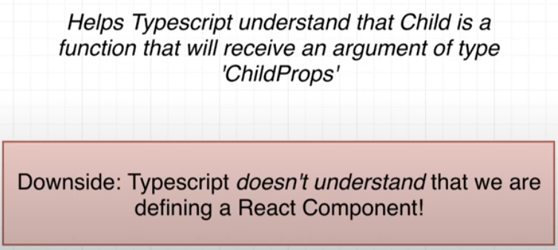
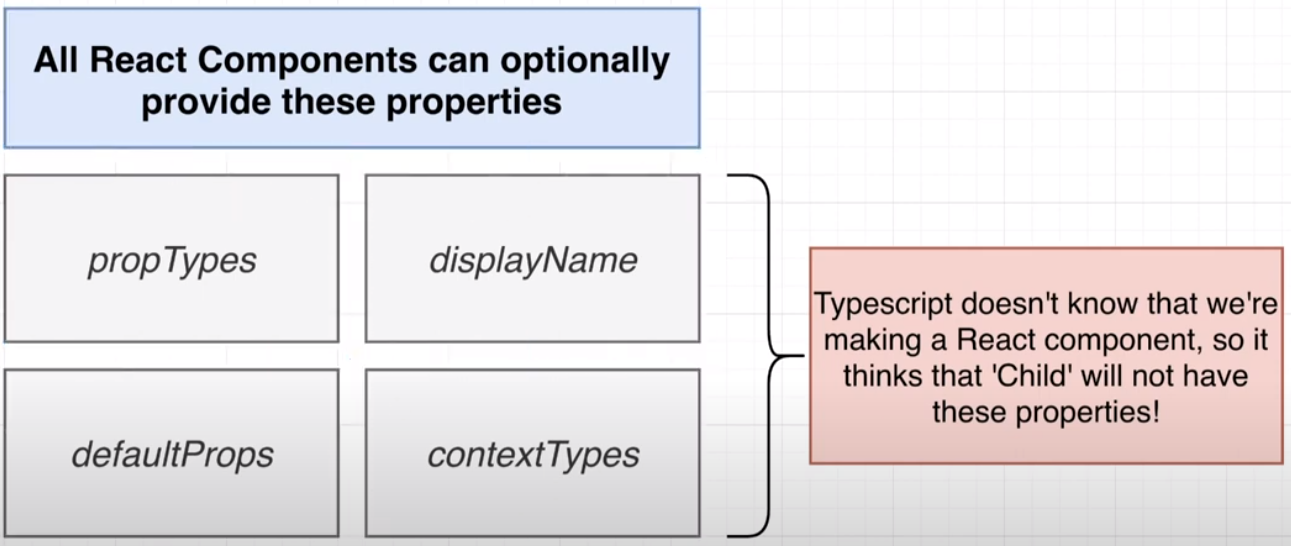
위에 나열된 4가지의 프로퍼티에 대하여
FC를 사용하는것이 위의 4가지 속성을 언제나 사용할 수 있고, 그것이 타입스크립트한테 우리가 리액트 컴포넌트를 만들었다는 사실을 명확하게 알려주는 방법이라고 설명되어있습니다.
FC 컨벤션을 알아보기 이전에 짧게 4가지 프로퍼티에 대해 정리하고 어떤 시점에 사용하는지 정리합니다.
propTypes:
propTypes is a property of a React component that is used to specify the types of properties (props) that a component expects to receive. This is used for type checking and can help catch bugs in the development process.
propTypes 속성은 구성 요소의 특성에 대해 예상되는 데이터 유형을 지정하는 데 사용됩니다.
이것은 구성 요소의 API를 문서화하고 구성 요소에 전달되는 속성을 검증함으로써 개발 중 잠재적인 버그를 탐지하는 데 유용할 수 있습니다.
contextTypes :
contextTypes is a property of a React component that is used to specify the types of the context that a component expects to receive. The context is a way for components to pass data down the component tree without having to pass props down manually at every level.
contextTypes 속성은 구성 요소의 컨텍스트에 대해 예상되는 데이터 유형을 지정하는 데 사용됩니다.
이것은 구성 요소의 컨텍스트 사용을 문서화하고 구성 요소에 전달되는 컨텍스트를 검증하여 개발 중 잠재적인 버그를 탐지하는 데 유용할 수 있습니다.
defaultProps :
defaultProps is a property of a React component that is used to specify the default values for a component's props. If a prop is not provided to a component, the default prop value will be used instead.
defaultProps 속성은 구성 요소의 특성이 제공되지 않은 경우에 대한 기본값을 지정하는 데 사용됩니다.
이는 프롭스가 지정되지 않은 경우 폴백 값을 제공하거나 컴포넌트를 사용하는 사람이 재정의할 수 있는 기본값을 설정하는 데 유용할 수 있습니다.
displayName :
displayName is a property of a React component that is used to specify the name of the component when it is displayed in the React developer tools. It is not necessary to specify a displayName, but it can be helpful for debugging and for understanding the structure of a React application.
displayName 속성은 React 개발자 도구에서 사용할 수 있는 구성 요소의 사용자 정의 이름을 지정하는 데 사용됩니다. 이는 React 개발자 도구에서 구성 요소를 식별하고 디버깅하는 데 유용할 수 있습니다.
실질적으로 어떤 시점에 사용할 수 있을까
클래스문법을 거의 사용하지않지만 간단하게 참고용 샘플정도만 첨부하겠습니다.
proptypes:
proptypes를 사용하면 컴포넌트가 예상하는 props의 유형을 지정할 수 있습니다.
예를 들어, 컴포넌트가 "name" 속성을 문자열로 예상한다면 proptypes을 사용할 수 있습니다.
import PropTypes from 'prop-types'; class MyComponent extends React.Component { static propTypes = { name: PropTypes.string }; ... }
contextTypes:
contextTypes를 사용하면 컴포넌트가 예상하는 컨텍스트의 유형을 지정할 수 있습니다. 예를 들어, 컴포넌트가 "theme"라는 컨텍스트 값을 문자열로 예상한다면 contextTypes을 사용할 수 있습니다.
import PropTypes from 'prop-types'; class MyComponent extends React.Component { static contextTypes = { theme: PropTypes.string }; ... }
defaultProps:
defaultProps를 사용하면 컴포넌트의 props의 기본값을 지정할 수 있습니다. 예를 들어, 컴포넌트가 "name" 속성을 문자열로 가지고 있다면 defaultProps를 사용할 수 있습니다.
class MyComponent extends React.Component { static defaultProps = { name: 'John Doe' }; ... }
displayName:
You can use displayName to specify the name of a component when it is displayed in the React developer tools. For example, you can use displayName like this:
class MyComponent extends React.Component { static displayName = 'MyCustomComponent'; ... }
함수형 컴포넌트 샘플
이 샘플에서 함수형 컴포넌트 "MyFunctionalComponent"는React.FC타입과 props, context를 위한 인터페이스로 지정됩니다.
propTypes와 contextTypes도prop-types라이브러리의string타입으로 지정됩니다.
defaultProps와 displayName 속성은 기본으로 설정됩니다.
import React from 'react'; import { string } from 'prop-types'; interface MyFunctionalComponentProps { name: string; } interface MyFunctionalComponentContext { theme: string; } const MyFunctionalComponent: React.FC
조금 더 실무에서 쓰이는 코드
import React from 'react'; import { Node, func } from 'prop-types'; import { ThemeContext } from './ThemeContext'; interface ButtonProps { children: Node; onClick?: func; } interface ButtonContext { theme: { background: string; textColor: string; }; } const Button: React.FC<ButtonProps> = (props) => { const { children, onClick } = props; const theme = React.useContext(ThemeContext); return ( <button onClick={onClick} style={{ backgroundColor: theme.background }}> {children} </button> ); }; Button.propTypes = { children: Node.isRequired, onClick: func }; Button.contextTypes = { theme: PropTypes.shape({ background: PropTypes.string.isRequired, textColor: PropTypes.string.isRequired }) }; Button.defaultProps = { onClick: () => {} }; Button.displayName = 'CustomButton'; export default Button;
In this example, the functional component "Button" is typed using theReact.FCtype and interfaces for the props and context. The propTypes and contextTypes are also typed using the appropriate types from theprop-typeslibrary. The defaultProps and displayName properties are set as usual.
이 예제에서 함수형 컴포넌트 "Button"은React.FC타입과 props와 context를 위한 인터페이스로 타입이 지정됩니다. propTypes와 contextTypes도prop-types라이브러리에서 적절한 타입으로 지정됩니다.
왜 필요한걸까
The propTypes, contextTypes, defaultProps, and displayName properties are optional features that can be used to provide additional information about a functional component in a React application.
propTyps, contextTyps, defaultProps 및 displayName 속성은 React 응용 프로그램의 기능 구성 요소에 대한 추가 정보를 제공하는 데 사용할 수 있는 선택적 기능입니다.
Overall, these properties can be useful for improving the quality, documentation, and maintainability of a functional component in a React application.
전반적으로 이러한 속성은 React 응용 프로그램에서 기능 구성 요소의 품질, 문서화 및 유지 관리성을 향상시키는 데 유용할 수 있습니다.
React.FC를 사용하는 경우
리액트 17 버전까지는 FC에 칠드런이 암묵적으로 적용되어있었기 때문에 사용하지 않는 경우가 많았습니다.
이후 리액트 18에서부터는 칠드런 속성이 제거되었기 때문에 더욱 사용하기 좋아졌습니다.
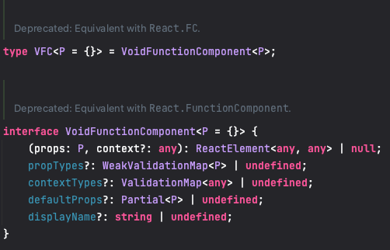
type FC<P = {}> = FunctionComponent
; interface FunctionComponent<P = {}> { (props: P, context?: any): ReactElement<any, any> | null; propTypes?: WeakValidationMap
| undefined; contextTypes?: ValidationMap | undefined; displayName?: string | undefined; } --- interface ChildProps { children : ReactNode; } const Child: FC is an optional type parameter with a default value of an empty object. This means that the function component can accept an optional prop object, and if no props are provided, the default value of an empty object will be used. Here's an example of how you might use this type alias: import { FC } from 'react'; const MyComponent: FC<{ name: string }> = ({ name }) => { return MyComponentis a function component that expects a prop object with anameproperty of typestring. 디폴트 값이 빈 객체이기 때문에 컴포넌트에 FC 컨벤션을 적용할 때 제네릭을 사용하지 않더라도 문제가 되지 않으며, 이로써 FC를 사용하여 옵셔널 프로퍼티들을 항상 사용할 수 있습니다. As of@types/react PR #46643, you can use a newReact.VoidFunctionComponentorReact.VFCtype if you wish to declare that a component does not takechildren. This is an interim solution until the next major version of the type defs (where VoidFunctionComponent will be deprecated and FunctionComponent will by default accept no children). 지금은 Deprecated된 VFC의 경우 FC가 묵시적으로 children 속성을 갖고있었기 때문에 사용되곤 했습니다. 리액트 18부터는 FC에서 children이 제거되었기 때문에 VFC는 더 이상 사용되지 않습니다. type Props = { foo: string } // 리액트 17 : PASS // 리액트 18 : ERROR const FunctionComponent: React.FunctionComponent 이 챕터는 제네릭을 이해하고, 인터페이스 및 타입에 적용시켜 조금 더 타입스크립트를 잘 사용할 수 있도록 하는것을 목표로 작성했습니다. 매개변수에 하나하나 타입을 지정하는 일반적인 단계에서 조금 더 확장성 및 간편한 사용법까지 알아봅니다. // anonymousFunction은 전체 함수 타입을 가짐 const anonymousFunction = (x: number, y: number): number => x + y; // 매개변수 x와 y는 number 타입을 가짐 const anonymousFunction: (x: number, y: number) => number = (x, y) => x + y; const normalFunction = (arg: string): string => arg; normalFunction('HELLO'); const genericFunction: interface GenericFunction { 제네릭 매개변수를 인터페이스의 매개변수로 옮기고 싶은 경우, 이를 통해 제네릭 타입을 확인할 수 있습니다. 함수를 사용할 때, 시그니처가 사용할 것을 효과적으로 제한할 특정한 타입 인수가 필요합니다. 타입 매개변수를 호출 시그니처에 바로 넣을 때와 인터페이스 자체에 넣을 때를 이해하는 것은 타입의 제네릭 interface GenericFunction 유틸타입을 들어가기 이전에 알아야하는 개념 - Index Signature / Mappped Type 인덱스 인덱싱에 사용할 인덱서(Indexer)의 이름과 타입 그리고 인덱싱 결과의 반환 값을 지정합니다. 인덱서의 타입은string과number만 지정할 수 있습니다. interface Item { [itemIndex: number]: string // Index signature } const item: Item = ['a', 'b', 'c']; // Indexable type console.log(item[0]); // 'a' is string. console.log(item[1]); // 'b' is string. // Error // TS7015: Element implicitly has an 'any' type because index expression is not of type 'number'. console.log(item['0']); item을item[0]이나item[1]과 같이 숫자로 인덱싱할 때 반환되는 값은'a'나b'같은 문자여야 합니다. interface Countries { KR: '대한민국', US: '미국', CP: '중국' } const country: keyof Countries; // 'KR' | 'US' | 'CP' // Success country = 'KR'; // Error // TS2322: Type '"RU"' is not assignable to type '"KR" | "US" | "CP"'. country = 'RU'; type OptionsFlags 제네릭 매개변수에 제약조건을 걸기 위해 사용하는 경우입니다. type Person = { age: number, name: string, }; const getProperty = <T, K extends keyof T>(obj: T, key: K): T[K] => obj[key]; const person: Person = { age: 22, name: "Tobias", }; // name is a property of person // --> no error const name = getProperty(person, "name"); // gender is not a property of person // --> error const gender = getProperty(person, "gender"); 이 샘플코드에서 K는 오직 T 속성만 될 수 있습니다. 다른 타입을 상속하거나 확장하는것은 불가능합니다. in과 keyof를 같이 사용할 경우가 mapped type입니다. 이 예시와 똑같은 구조로 유틸 타입 Partial //Make all properties in T optional type Partial 이와같이 모든 속성을 옵셔널로 바꿔 사용할 수 있기 때문에 옵셔널 인터페이스를 다시 만들 필요가없습니다. 그러나 여러곳에서 Partial를 사용할 경우 적용된 타입을 만들어서 사용하는 것이 좋을것 같습니다. 리액트의 컴포넌트 타입들 중 몇몇은 유틸을 적용한 타입을 선언 및 alias로 간단하게 사용하기도 합니다. type FC<P = {}> = FunctionComponent ; type VFC<P = {}> = VoidFunctionComponent ; type ForwardedRef interface User { name: string, age: number, email: string, isValid: boolean } type TKey = 'name' | 'email'; const user: Pick<User, TKey> = { name: 'Neo', email: 'thesecon@gmail.com', // ERROR // TS2322: Type '{ name: string; email: string; age: number; }' is not assignable to type 'Pick<User, TKey>'. age: 22 }; pick과 반대개념입니다. interface User { name: string, age: number, email: string, isValid: boolean } type TKey = 'name' | 'email'; const user: Omit<User, TKey> = { age: 22, isValid: true, // ERROR // TS2322: Type '{ age: number; isValid: true; name: string; }' is not assignable to type 'Pick<User, "age" | "isValid">'. name: 'Neo' }; 지금까지 기초적인 예제 및 간단한 구현코드로 개념을 이해하고 사용법을 숙지했습니다. 이후로 실무자들이 타입을 선언 및 지정하는 컨벤션에 대해 여러가지 논의가 이루어지는 단계로 넘어갈 수 있습니다. 기존의 프로젝트 ( 중박 ) 에서의 API 타입의 타입 지정은 하나의 파일에서 관리되고 있었습니다. 무려 1830 라인이나 되기 때문에 협업시에 원하는 타입을 찾기가 쉽지 않습니다. 디렉터리 구조에서 이미 관심사로 API들을 분리해두었기 때문에 타입들도 이에 맞추어 분리시켜도 좋다는 의견이 많았습니다. 하나로 관리되던 API 타입들도 분리된 파일에 작성하도록 하여 실무자들이 사용하는 타입을 조금 더 쉽게 참조할 수 있도록 합니다. 위에서 알아보았던 유틸 타입이나 제약조건들을 알맞게 사용하여 원하는 위치에서 사용하고자 하는 타입들을 커스텀하여 사용하도록 합니다. 참고자료의 경우 리액트 17을 주로 다루기 때문에 필요에 따라 리액트 18과 비교할 필요가 있습니다. https://stackoverflow.com/questions/59988667/typescript-react-fcprops-confusion https://dev.to/xenoxdev/usage-of-reactfc-from-my-experience-22n7 https://react-typescript-cheatsheet.netlify.app/docs/basic/getting-started/function_components/ https://www.harrymt.com/blog/2020/05/20/react-typescript-react-fc.html https://blog.logrocket.com/how-to-use-keyof-operator-typescript/ https://stackoverflow.com/questions/57337598/in-typescript-what-do-extends-keyof-and-in-keyof-mean https://mariusschulz.com/blog/keyof-and-lookup-types-in-typescript https://github.com/radlohead/typescript-book/blob/master/docs/jsx/react.md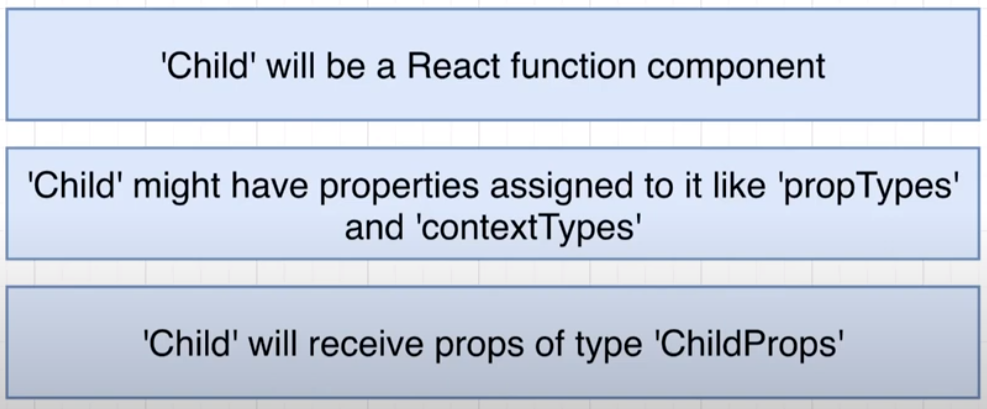
The type aliasFCis used to specify the type of the function component, and the angle brackets<{ name: string }>are used to specify the type of the prop object that the component expects.
React.VFC ( Deprecated )
Infering the types - Contextual typing
일반적인 함수의 타입 지정 및 호출 방식
제네릭 함수의 타입 지정 및 호출 방식
함수에 제네릭 인터페이스 적용
제네릭 매개변수를 전체 인터페이스에 적용
부분을 설명하는 데 도움이 됩니다.
제네릭과 여러가지 타입 조건들 적용해보기
간단한 예시
인터페이스Item= 인덱스 시그니처
item을item['0']과 같이 문자로 인덱싱하는 경우 에러가 발생합니다.
keyof
인덱싱 타입을 유니온으로 적용하는 단계
Mapping Type
키를 통해 타입을 반복적으로 생성하는 제네릭 타입
keyof 와 maaping type 조금 더 깊게 이해해보기
extends keyof
in keyof
인덱스 시그니쳐를 사용하여 정의하는 경우에 사용합니다.
type Person = { age: number, name: string, }; type Optional<T> = { [K in keyof T]?: T[K] }; const person: Optional<Person> = { name: "Tobias" // notice how I do not have to specify an age, // since age's type is now mapped from 'number' to 'number?' // and therefore becomes optional };
기본적으로 유용하게 쓸 수 있는 유틸타입
Partial
제네릭의 모든 속성들을 옵셔널로 바꿔줍니다.
간단한 사용예시
export interface Task { id: string; title: string; state: string; completed: boolean; } // ERROR // TS2741: Property 'completed' is missing in type // '{ id: string; title: string; state: string; }' but required in type 'Task'. const defaultTasks: Task[] = [ { id: '1', title: 'Something', state: 'TASK_INBOX', }, ... ]; // SUCCESS const defaultTasks: Partial<Task>[] = [ { id: '1', title: 'Something', state: 'TASK_INBOX', }, ... ];
export interface Task { id: string; title: string; state: string; completed: boolean; } // 옵셔널 인터페이스 export interface OptionalTask { id?: string; title?: string; state?: string; completed?: boolean; } // 타입을 여러번 만들어야돼서 불편함 const defaultTasks: OptionalTask[] = [ { id: '1', title: 'Something', state: 'TASK_INBOX', }, ... ];
export interface Task { id: string; title: string; state: string; completed: boolean; } // 유틸을 적용시킨 타입을 새로 지정 export type TaskPartial = Partial<Task>; // 사용위치 1 const defaultTasks: TaskPartial[] = [ { id: '1', title: 'Something', state: 'TASK_INBOX', }, ... ]; // 사용위치 2 export const fetchTasks = createAsyncThunk('todos/fetchTodos', async () => { const response = await fetch( 'https://jsonplaceholder.typicode.com/todos?userId=1' ); const data = await response.json(); return data.map((task: TaskPartial) => ({ id: `${task.id}`, title: task.title, state: task.completed ? 'TASK_ARCHIVED' : 'TASK_INBOX', })); });
partial를 매번 적용해서 쓸 것인지 적용한 타입을 선언해서 쓸 것인지는 컨벤션 차이이며,
Pick
TYPE에서KEY로 속성을 선택한 새로운 타입을 반환합니다.
간단한 사용예시
export interface Task { id: string; title: string; state: string; completed: boolean; } export type TaskPartial = Partial<Pick<Task, 'id' | 'title' | 'state'>>; const defaultTasks: TaskPartial[] = [ { id: '1', title: 'Something', state: 'TASK_INBOX', }, ... ];
Omit
TYPE에서KEY로 속성을 생략하고 나머지를 선택한 새로운 타입을 반환합니다.
간단한 사용예시
export interface Task { id: string; title: string; state: string; completed: boolean; } export type TaskPartial = Partial<Omit<Task, 'completed'>>; const defaultTasks: TaskPartial[] = [ { id: '1', title: 'Something', state: 'TASK_INBOX', }, ... ];
실무에서 적용할 수 있는 사례
API 호출 후 데이터 타입 지정 및 응집성에 대한 논의
ex ) ApiTypes.ts
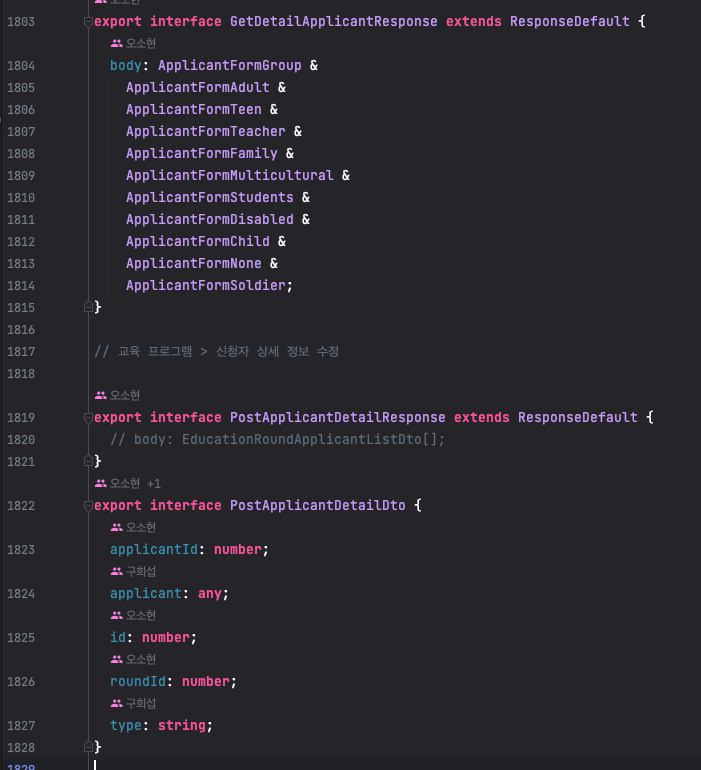
팀원들간의 논의에서 도출된 대안
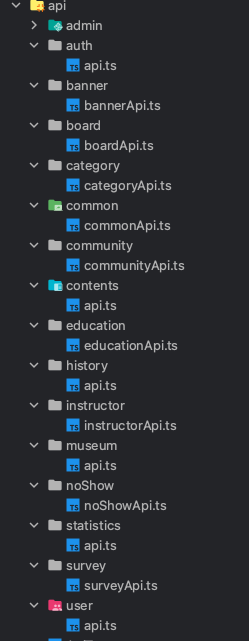
호출하는 API들을 이미 관심사에 따라 분리하여 디렉토리 구조를 설계함
기본적으로 제공되는 API를 베이스 타입으로 모두 정리합니다.
매번 타입을 사용할 때마다 새로운 타입을 만들어서 사용하지 않을것
가장 기본이 되는 타입을 찾을 수 없음
이미 존재하는 타입을 유틸 타입이나 제약조건을 걸어서 사용할 것
언제나 타입을 참조하여 원본 타입을 찾을 수 있음
Reference